Charging
- Fully charge the battery when using for the first time.
- When the rechargeable battery is running low, the color of the power supply indicator lamp will change to red. Charge the battery as soon as possible.
- It takes about 12 hours maximum to charge the battery fully. (This time may vary depending on usage conditions.)
- Charge the product in a well-ventilated place (10 to 35°C (50 to 95°F)) away from direct sunlight. Otherwise, the battery may deteriorate, possibly resulting in shorter periods of continuous use or may fail to charge.
-
Connect the included USB cable (USB Type-C side) to the product’s charging terminal.
- The included USB cable is designed for exclusive use with the product. Do not use any other USB cable.
- When inserting the USB cable into the USB power adapter or charging terminal, insert it directly (horizontally).
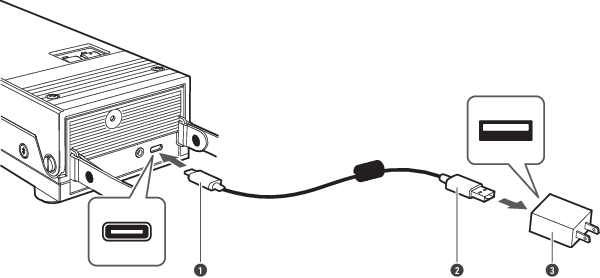
- USB Type-C
- USB Type-A
- USB power adapter (sold separately)
-
Connect the included USB cable to a commercially sold USB power adapter and plug it into an outlet to start charging.
- While charging, the power supply indicator lamp lights/flashes as follows. (It may take several seconds for the power supply indicator lamp to light.)
Power supply indicator lamp Status No change (white) Charging / Charging complete (power ON) Flashing red[1] Charging (power OFF) Off Charging complete (power OFF) Flashing red quickly Charging error [1] To prevent deterioration of the battery, if the remaining battery level is above the specified value, the indicator lamp flashes red twice and turns off, and charging is not performed.
-
When charging is complete, disconnect the USB power adapter from the outlet.
-
Disconnect the USB cable from the product’s charging terminal.

|
|
|---|