Attaching an AC adapter replacement plug to the AC adapter
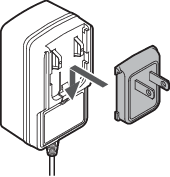
Attach the AC adapter replacement plug for the outlet you are using to the AC adapter.
-
Select the plug that fits the outlet you are using.
-
Align the tabs on the underside of the plug with the recesses on the AC adapter, and slide the plug into the AC adapter until it clicks into place.
Removing the AC adapter replacement plug
-
Press and hold the PUSH button and slide the AC adapter replacement plug up to remove it.
Types of AC adapter replacement plugs
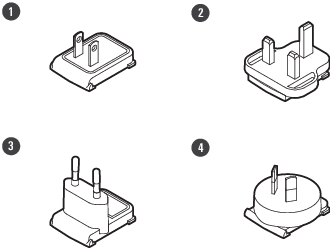
The product includes four different AC adapter replacement plugs (A, BF, C, and O types). Attach the AC adapter replacement plug for the outlet you are using to the AC adapter.
-
A type
-
BF type
-
C type
-
O type