Operations during music playback
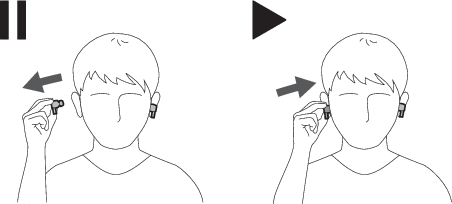
When removing the headphones from your ears, music is paused automatically. Music playback will resume when the headphones are inserted into the ears again.
- Use the headphones or the Bluetooth device to first begin music playback.
- When both headphones are inserted into the ears, removing one or both headphones will pause the music. Music playback resumes when both headphones are inserted into the ears again.
- Music playback does not automatically resume if only one headphone is inserted into an ear. Use the Bluetooth device for operation in such cases.

|
|
|---|
Turning ear detection function on/off
The ear detection function can be turned on or off. When the function is turned off, the multifunction buttons and touch sensors will remain unlocked, enabling button and touch operations without having to insert the headphones into your ears.
-
Touch and hold (about 6 seconds) the touch sensor on the L (left) side headphone while music is paused.
With every long touch (about 6 seconds), the voice guidance will play the message “Ear detection on” or “Ear detection off”, and the ear detection function will be turned on/off.