ESW-CHG4
-
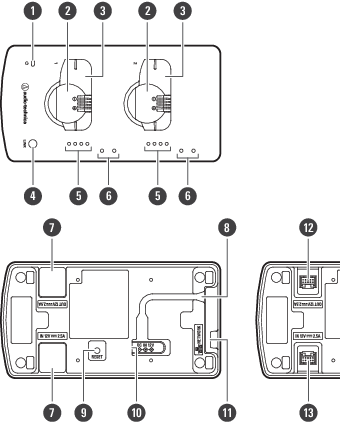
Power indicator lamp
Lights when the device is on. This lamp also shows the network connection status.
-
Charging port (for ESW-T4102/C510)
-
Charging port (for ESW-T4101)
-
LINK button
Use to configure links.
-
Status indicator lamps
Show the charging status.
-
Mounting holes for mic holder
Use to mount mic holders.
-
Cap for DC jack
Removed when linking multiple charging stations.
-
Cord outlet
Passes the power cord of the AC adapter.
-
Reset button
Use to check the network mode, reset the network, and perform a factory reset.
-
DC input jack
Connect the AC adapter.
-
Network port
Use to connect a LAN cable (Cat. 5e or higher, shielded cable). This port connects to a local area network, allowing for external control via applications.
-
DC output jack for linking
Use to link multiple charging stations. This jack communicates with and supplies power to the linked charging stations.
-
DC input jack for linking
Use to link multiple charging stations. This jack receives communication and power supplied from the linked charging stations.
Mic holders
If you mount the included mic holders on the device, you can hang pin microphone cables on these holders during charging.
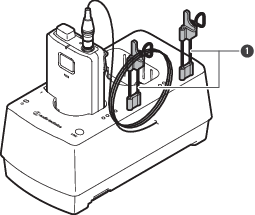
- Mic holder