ESW-T4101
Turning the device on/off
-
With the device off, press and hold (approximately 2 seconds) the PUSH button.
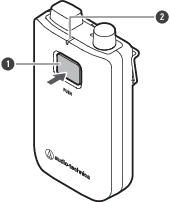
- PUSH button
- Status indicator lamp
The device turns on. When the link with the receiver is established, the status indicator lamp lights.
-
With the power on, press and hold the PUSH button for approximately 2 seconds, and then release the button.
The device turns off.

|
|
|---|
Switching between muted and unmuted
-
With the device on, quickly press the PUSH button.
- The device switches between muted and unmuted each time this button is quickly pressed.
- The status indicator lamp lights.
- PUSH button
- Status indicator lamp
Status indicator lamp display Operation status Lit in red Muted Lit in green Unmuted
Checking the battery level
-
With the device on, press and hold (approximately 5 seconds) the PUSH button.
- The status indicator lamp flashes.
- PUSH button
- Status indicator lamp
Status indicator lamp display Battery level Flashing in green (one time) 0% to less than 25% Flashing in green (two times) 25% to less than 50% Flashing in green (three times) 50% to less than 75% Flashing in green (four times) 75% or more
Battery level alert
If the battery level drops too low, the status indicator lamp flashes. Charge the battery.
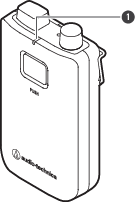
- Status indicator lamp
| Status indicator lamp display | Battery level alert |
|---|---|
| Flashing in orange | There is no battery power. The device will turn off within 30 minutes. [1] |
| Flashing in the color the lamp lights in when the device is muted/unmuted | The battery level is low. The device will turn off within 60/90/120 minutes. [1][2] |
[1] The time is a guideline. It varies depending on usage conditions.
[2] This function is turned off with the factory default settings. You can set the time to 60/90/120 minutes with “Battery Alert” under “Device Setting”. Refer to Wireless Manager device settings for details on “Device Setting”.
How to attach an external microphone
Attach a cH connector-compatible external microphone.
- Guitar cables are not supported.
-
Remove the cap for the input connector.
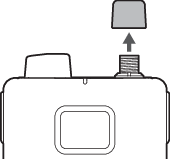
-
Connect the external microphone to the input connector and tighten the screw part.
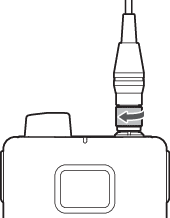
|
|
|
|---|
How to wear the device
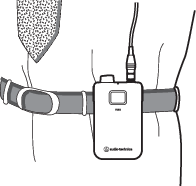
You can use the clip of the body-pack transmitter to attach it to a belt or something similar when using the device.
How to mount a neck strap
You can mount the included neck strap to the strap hole or clip of the body-pack transmitter to hang the device from your neck when using it.
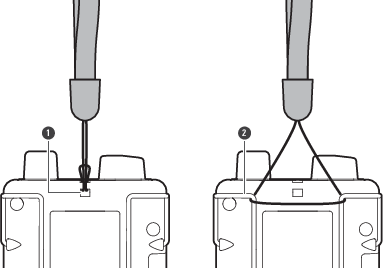
- Strap hole
- Clip