“Link Configuration” screen
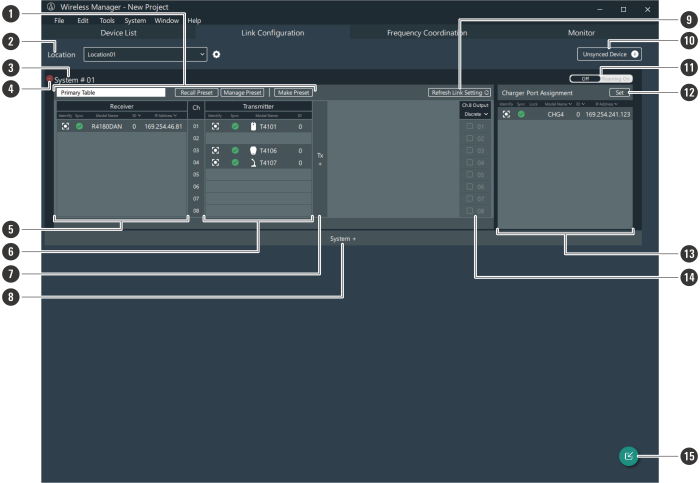
Use this screen to configure device links for each system. You can also set the mix out and the charging station port assignments as well as switch to roaming mode.
-
Preset
Displays the applied preset. You can also recall, manage, create, and edit presets. Refer to Presets for details.
-
Location
As necessary, set the name of the location where this system is installed. Refer to Setting the location name for details.
-
System
Configure links for each system.
-
Delete (−) button
Click the button to delete the system.
-
Receiver area
Use this area to register receivers.
-
Transmitter area
Use this area to register transmitters.
-
Add area button
Click the button to add a transmitter area.
-
Add system button
Click the button to add a system.
-
Refresh Link Setting
Updates the receiver and transmitter link configuration. If a link is not established properly, clicking this button may solve the problem.
-
Unsynced Device
Among all the connected devices that are recognizable as online, displays those devices that are not synchronized in the device list.
-
Off/Roaming On
Click the icon to switch to roaming mode. Refer to Roaming mode (ESW-R4180DAN only) for details.
-
Set
Set the charging station port assignments. Refer to Setting charging station port assignments for details.
-
Charging station area
Use this area to register charging stations.
-
Mix out setting area
Sets the mix out. Refer to Setting the mix out for details.
-
Import button
Configures links to devices from a created device list. Refer to Configuring links to devices added to a device list for details.